The post How to Build an Email List appeared first on BigAffMarketing.
]]>This how-to article on list building takes at look at winning email marketing strategies that are working today and breaks the process down into bite sized pieces.
When I first started out, the best piece of advice that I heard (and remember the most) was “The money is in the list!”
That turned out being the best advice ever, and it’s even more critical to success now than ever before.
To build a successful internet marketing business, you really need to start building your solid list of email subscribers immediately.
List building is the best thing to do if you are serious about making life changing money online.
Start to build your email list… TODAY!
The advantage of doing this today is that you end up with a customer base that you can promote to in the future.
1. As you create an income from your list – that list will become an asset, which means your business is more valuable.
2. You can still make money from your list, even if for some reason your website stops getting traffic.
3. You will not have to depend on Google rankings and that alone gives you online security.
If you are not already convinced that building a list of subscribers is the way to go, then check out this video from Derek Halpern:
Start converting your visitors into subscribers
1. First, you need to find a way to build a landing page that can convert. Then continue to test and tweak it until it rocks!
2. Next, you have to have something of value to offer your visitor for free. In return they will offer you their email address. Fair trade!
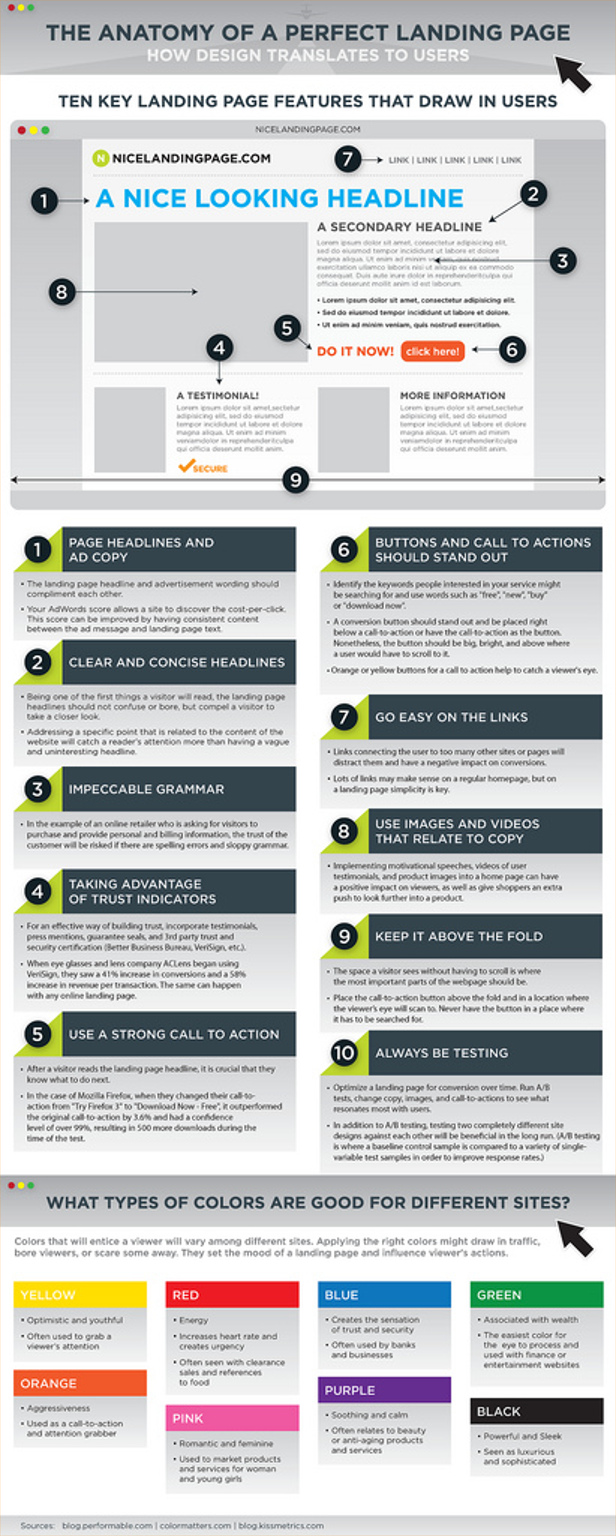
Here is a cool infographic from Kissmetrics that step by step shows you 10 key features that will help your landing page convert better.
Also check out the interesting information about colors and how they can affect the mood and actions of your visitors.
If the gift is high quality and it gives you good information you can use, then it was a good trade – and you just helped them build their list!
This is the part of success that is the most rewarding. The good will and the magic that is created by helping people is always more important than any money you might get in the exchange. Russell Simmons said it best when he said “Givers get given to…”
How you build trust and credibility
It’s one thing to build your list, but maintaining that list has to be your main focus and priority!!
Once a person has subscribed to your list your 2 goals should be to:
1) Build trust with your new subscriber and
2) Keep that new subscriber happy – so he or she will stay on your list for as long as possible.
If you mess up an email you sent out or you forgot to send that broadcast email to your list – don’t be afraid to tell them about it!
Be completely honest with them!
The same goes for a great new blog post or website you like – tell them about it!
If you use a new product or service that you like and works great, or if you find a product that is a rip-off and doesn’t work, be sure to let your list know… Let everyone know!
This will build trust with your list and in the future when you want to promote your new product (or an affiliate product) they will be much more likely to buy from you instead of the competition.
If you don’t give your subscribers valuable information, or if you try to sell them something every time you send them an email (read: “spam”) don’t be surprised when they click that ‘unsubscribe’ link and are gone forever.
Seriously! DO NOT try to promote or sell something to them straight away!
This is a major turn-off for new subscribers and leaves them with the impression that you only want them for their money. Know that the first emails in your autoresponder series need be meaningful, helpful and valuable!
Sometimes it’s ok to re-direct them to your Thank you page with a few free offers on it or maybe to a sales page after they sign up, but hold off from emailing sales copy to your new subscribers for a least a week or two!
Automate the process – Get a GetResponse account
There is one tool that I have used since I first started in this business, and that is GetResponse.
They are a high quality autoresponder service that is head and shoulders above their competition. Not only will they help you manage your lists, but you’ll have professionally designed page templates, free access to stock photos and 24×7 customer service!
You can set up all your emails in advance to send out to your list and schedule them out over a specific period of time. Or you can send a broadcast email/ email blast that goes out to your entire list!
GetResponse is about $15 a month – but you can check it out here free for your first month!

Build a list of responsive leads and keep adding fresh subscribers to your list so you can talk with them and market to them regularly. The sooner you start the better.
If you need that extra nudge to get started, check out the discount pricing on these industry leading service providers. You’re going to need these essential tools eventually so you might as well save a few bucks at the same time.
Click here to check out the special pricing for my tribe:
The cost of your first month can be less than $20, and you’ll be set up with the best service providers your money can buy. Once you have these three basic tools, you simply need to get them working together for you, which is relatively simple and easy.
Next, you will need to get started on a great squeeze page/opt-in page and a free offer that you can give away to attract people to your list.
If you’re interested in learning more about advanced squeeze page/landing page design go here: Read this article about WordPress Marketing and website builders to learn about the tools you can use to make high-converting landing pages.
Seriously, a small website and a few good converting landing pages is all you need to start seeing results.
Many successful email marketing business owners got started this way and if you decide you want to build the same type of business yourself there is no reason why it won’t work for you.
Don’t worry – it’s easy to do.
There are some great website builders available these days and every quality autoresponder service has training videos to help you get started. I think GetResponse is easier to use than Aweber, (and I have used both) which is why I personally use GR. But it’s worth it to check them both out to see which one you like best.
Now you have everything you need to create and deliver your value-packed autoresponder series so you can welcome your new prospects into your fold.
All you do is write up your welcome or Thank you message, and then add a few more messages to follow daily or spaced a few days apart so your new friends can start to get to know you.
If your having trouble with this and find yourself just staring at a blank page, you can always find a few emails from some of the lists that you’re subscribed to that will help you get ideas. The best internet marketers have mastered email marketing and the way they build a unique relationship with their customers. It’s powerful stuff and should be studied.
You could use their emails as models, but DON’T copy them – just change them up with your own message using your own voice and you’ll heading in the right direction.
Look at it like this: you’re just getting started, so there’s no sense worrying about re-inventing the wheel! Once you get the first few messages done, the next ones get easier – trust me!
If your goal is to have a profitable and sustainable business that can support the lifestyle that you desire, you have to be willing to work for it.
The good news is that building a list is something you can master – so just roll up your sleeves and get busy.
Communicate with your subscribers regularly and consistently. Take pride in your work and always provide value in your products and services. This makes it a win-win for your customers and for you!
Take ACTION – and get started building a list and making money! You’ll see that success doesn’t take brains, only the desire and a little creativity.
Keep it simple, have fun and enjoy the journey.
Interested in some more free training? …check out this free List Building Video Series from STEALTHListBuilding.com
The post How to Build an Email List appeared first on BigAffMarketing.
]]>The post Best WordPress Website Builder appeared first on BigAffMarketing.
]]>Do you remember that feeling when you were little, trying to decide what flavor of ice cream you wanted – but had a hard time deciding because they all looked soooo good?
You could’ve been there for hours, just trying to decide between chocolate swirl and the pralines and cream.
Then, in the end, your mom made you hurry up and choose rocky road just so you could finally get it over with.
You were frozen by analysis paralysis, which caused you that indecision and possibly maybe even mental stress… all you were trying to do was decide between the variety of options available, all equally good.
This is what happens to many of us when choosing from all the different website creation tools and platforms that are available today.
To the untrained eye, they all look good. But what if you would have had an easy user guide that helped you figure out exactly which ice cream to get?
You woulda been outta there in no time!
Actually, there isn’t a user guide for ice-cream, but it would be cool if there was one.
But the easy user guide for choosing a website builder does exist, and you’re reading it!
Soon, after you read this article and do a little research, you’ll know a good website builder when you see one, and you’ll be on your way in no time at all!

How to Get The Most From Your Marketing
Step 1: What are you trying to achieve?
What is the goal you wish to accomplish with your website? It sounds simple enough, but the answer will guide you to the solution.
Here are some common goals you could have for your website:
- Collect Leads
- Set up a simple blog
- Promote a product or sell a product
- Collect likes and followers
Every website should have a specific goal. What is yours?
Step 2. What is your skill set?
Fortunately, many of the skills needed to build a website are pretty easy to learn.
- Can you develop new skills?
- Are you creative?
- Do you enjoy figuring out how things work?
Web design moves quickly, and one thing you have to remember is you can’t know it all and you just need to learn the basics and get comfortable with the chaos.
Luckily, there is a huge network of skilled people who are happy to share their knowledge, and Google search results will often help you find and focus on the information that you need in less time.
But if you’re just starting out and have trouble cropping or resizing a picture, downloading an app or setting up a Facebook or Twitter profile, then maybe a free online building-block website builder is what you need.
There are many of these low cost website builders that sound pretty good and rarely cost you any more than you’d pay for web hosting package – but like everything, please be sure to read the fine print.
That said, if you don’t mind learning a few new skills, you’re creative, and you enjoy figuring out how things work and honestly believe that experience helps you grow –
then keep reading!
Step 3. How much do you want to spend?
You are going to invest in your new website – so you need to decide on a budget for how much you can afford to spend.
- Do you want to spend the big bucks for a professionally built site?
- Can you appreciate spending less and having more control of the design?
- Would you invest in a website builder that you can turn into extra income?
Sometimes the tools you buy and use to build your site when you’re starting out can end up costing you more than just time and money.
Additional upsells and optional packages with features you need to have can also include contracts, limitations and always additional costs.
Should you decide to move your website somewhere else, ongoing monthly costs that you’re saving will be the least of your worries. With some platforms available you will find out you can’t take your website with you when you leave, or you have to pay to take it with you.
No situation is exactly the same, but many companies make it extremely unpleasant for you if you want to move your website somewhere else.
But the long story short is that it could end up being more expensive if you end up changing your mind. After all that hard work, that just doesn’t seem right.
It would be nice if you’re going to spend the time to start an online marketing website, that you could get started in the right direction and avoid these types of bottomless pits.
This is a story of my journey, and maybe something like this has happened to you:
When I was looking to get a website built and met with some guys in their fancy downtown office, I remember how surprised I was when they told me it would take them a month and it would cost me $10,000!
I wanted to work with the designers, so I checked locally first. I thought it might be easier to get the website I wanted if I could work with someone just down the street instead of outsourcing it to someone half way around the world.
But seriously, there had to be a better, less expensive way.
So, I started shopping around online and saw there were offers for $5,000, and offers for $1200… and even found someone advertised that they would build an Amazon sellers website for $28.
It might be worth it, but not $10,000 worth it! Or $5,000 worth it… not now at least.
And you have to remember the old saying: “You get what you pay for” and the other, probably even older saying “it’s always time vs. money.” More on that later.

Don’t Let “What To Do” Stop You!
When it comes to building a website you can do it one of two ways. Pay someone to do it for you, or do it for yourself.
You start to think maybe building your own website is the way to go, and you decide to go it on your own.
You dig a little deeper and start seeing all these ‘done for you’ website builders with “free” hosting that are going to make your life so easy…
All the Weeby’s and the Squares and the GoDad’s… and all for a monthly fee…
And then you start hearing the horror stories of everyone who has tried them and loved them, and tried them and hated them…
And all of the success stories in between of the believers who tried them, hated them, wasted their money and ended up going it on their own and building their own website themselves.
One thing for sure –
- …you know you need a website
- Passion: required.
- Ability to learn: optional.
- Learning curve: included. (no extra charge)
You find out that first you need a domain name, and next you need webhosting with servers to host your new website… that’s easy.
You learn about autoresponders and how to manage your email list that you’re going to be building… shouldn’t be too difficult.
Then you hear about WordPress.
But if you don’t know CSS or html coding, will WordPress even work for you?
Believing in your mad tech skills, and always being ready for adventure, you take the leap of faith.
You decide to take that first step to get started. You’ll figure out what you don’t know, and then search out how to find the answer… easy enough.
It takes time to learn new tricks, and you know that by simply having the dream and vision and the strength to keep pushing forward nothing can stop you. Be patient and persistent, and take the time to find your way around any roadblocks in that come up (both physical and mental) and you’re going to make it happen… it’s just a matter of time.
Especially if you’ve never done something like building your own website before. Rest assured, many give up before they even get started. But like me, you’re different.
You’re not going to give up! You can do this. And any mechanic will tell you, it takes tools to get the job done right! Good tools.
You’re going to learn about the tools can make the job easier and help you do what you need to do, and pretty soon you’ll be heading in the right direction and seeing results.

WordPress Is the Absolutely Free No-Brainer
WordPress is the most powerful and easiest to learn blogging and website CMS (or content management system) in existence today. The WordPress.org download counter shows 32,162,959 and counting (check it out for yourself) at the time this post was written.
That’s over 32 MILLION times the various versions/ updates have been downloaded, so it’s safe to say there are quite a few websites out there using WordPress… Wikipedia says that WordPress is the most popular blogging system in use on the Web at more than 60 million websites.
WordPress can be downloaded and installed for self-hosting from WordPress.org, and most web hosts have an easy one-click installation available.
…or WordPress can be used with hosting provided for free from WordPress.com.
But we’re not talking about the “free” website you get at WordPress.com* and I will NOT recommend you use WordPress.com either.
Sure, they will host your site for free – but they will almost literally and practically own you… You can’t advertise or do any of your own monetization (in any sense of the word) with them, they control that and they are happy to do the advertising for you. Oh, and another thing is they can also shut down your site at any time. ‘Nuff said? But wait… there’s more…
*One more side note: To have your own domain name show up like you want it to and look professional (i.e. www.yourcoolwebsitename.com) you will want to pay for hosting and buy your own domain name. See the post on WordPress.org or .com? here.
Your theme is the basic design of your website, and that combined with the power of the plug-in, controls how your website looks and functions.
Free themes. paid themes and done for you themes. Free plugins and paid plugins. Some with more advanced features that you may or may not have to pay for. There must be at least a million different options. Maybe a million and one. The same goes for plugins.
Plugins can modify the way your theme displays information and helps “tell” the theme what you want it to do. However, it can take you a lot of time and effort to get everything to work together.
Nevertheless, the possibilities are endless.
Using tools can make this job easier, which allows you more flexibility to control your website and manage the way it looks and the things it can do.
There are a lot of site building tools when it comes to building a website that will save you time and make the job a whole lot easier.
Some are better that others and some don’t work at all. Usually, the more expensive tools provide better results. But not always. Now we’re back to the “time vs. money” part of the story.
The RIGHT Website Builder For The Job
Believe me, I’m always looking for the best bang for my buck, and that said I have bought more than a few tools that didn’t work like they said they would.
The other thing I would say is remember: …it’s not the tool that builds your business and makes you money… It is YOU actually DOING the stuff.
When you’re getting started, you only need certain basic tools, and everything else can wait until you can you and your business really needs it.
But from experience, if you find a good tool that doesn’t cost you an arm and a leg – it makes it much easier to get started building the website and online business you’ve seen in your dreams.
And if it will save you a ton of time – even better! Living proof talking here.
While this article won’t give you a comparison of what every WordPress site builder can do and could cost, there are a few leaders that stand out in the crowd when it comes to building a marketing website or blog.
Every business has start-up costs. The truth is that you just need pick a solid framework to start building on.
What it really comes down to is options. Most of the themes you can get don’t come with ready-to-edit landing pages, and the same goes for most landing page builders available – they don’t come with a selection of different homepage themes.
These are only two of the things you could end up needing.
You might also like to get more for your money. More features and more benefits.
Themes come in all shapes and sizes – and prices, too.
Optimizepress and StudioPress are a couple of really nice themes. Optimizepress can be used ONLY on sites you OWN and RUN… Pricing starts at $97-$139 a year, and they offer different priced packages with the most expensive Pro Package selling for $297-$495 a year – depending on if they’re running a promo or not.
After the first year, you need to pay for the optional renewal if you want continued support and the latest updates.
StudioPress themes go for a one-time payment that cost from $59 to $99 each and up. With a pro package that includes all 87 of their themes for $499… (Note: Studio Press is built on the Genesis framework and while it produces terrific results, you may find it difficult to customize unless you know CSS and php coding.)
This is just an example of what you’re looking at if you want to buy a theme to build your website homepage on, and a sample of what you might end up paying for advanced and professional looking WordPress themes.
Just don’t waste your time with a free theme. Please.
A free WordPress theme will not give you the results that a page builder complete with a variety of pre-made pages will give you… and believe me when I say they’re almost always more trouble than they’re worth when it comes to trying to modify them to get the look and performance you want. Honestly, you’re welcome to try one, but just don’t be surprised, k?

A Place to Land – GOOD Landing Page Design is Key
You’ll also need a good landing page with an opt-in form for people to subscribe to the email list you’re going to build, and you’ll also want to have a Thank you page so it’s easy to deliver your opt-in gift for your new subscribers.
For landing page builders, Optimizepress is a more expensive option, (from $100-300 a year and another $249 if you want to get a developers license good for 5 sites). You can get a few landing pages for free from them, so take advantage of that if you just want to get going with a couple of limited pages – just to get started.
Or you can pay for LeadPages (from $200-300/year for just landing pages) but can pay monthly if you want to.
But these aren’t the only options available out there, and it’s true you may find something that costs more or costs less and gives you everything you’re looking for.
If code isn’t your specialty (it isn’t mine!) you might want to look at a complete site builder that gives you everything you need all wrapped up in a nice little package.
Which is what led me to try ProfitBuilder.
WPProfitBuilder is a one-time payment, complete solution with all the pages you need, and can be purchased with a developers license if you decide after you get started building sites you want to earn a little extra income from building and selling websites to potential customers.
Everyone knows that lead generation is the lifeblood of your business, and ProfitBuilder is the powerful and complete all-in-one solution designed to help you grow and build out your business.
Armed with all the plugins and over 60 pre-loaded endlessly customizable marketing pages – your new website is now a user friendly, lead collecting and product promoting powerhouse. You get fully search optimized and mobile responsive pages automatically with no extra work.
Your homepage, and every other page you create will always look stunning on any and every device!
Video sales pages, Opt-in pages, Thank you pages, Webinar pages, and even eCommerce and Membership pages – all created in real-time with the drag-and-drop live editor and a few clicks of a mouse.
This means you see all the changes you make to your page and content live on the page, without having to refresh, reload or preview… Don’t worry though, you can still preview and see what it looks like online, with a mobile or tablet view as well if you want to. 
It also integrates with the leading autoresponder message delivery providers and the popular payment services.
You’ll see that this truly is a complete, all-in-one solution.
Once you get used to the system, you will come to appreciate the quality of the amazing themes and landing page templates that you can quickly and easily set up.
Combine that with the developers license and you have a great long term investment.
The most important step is researching which tools to invest in that will help you achieve the end result you’re looking for. I found one of the biggest barriers to entry for me was actually figuring out where to start, what to invest in and what NOT to invest in.
Hopefully this article gives you an excellent foundation to build on, and helps you decide on the best tool to make the most out of your time and marketing efforts.
This page and website was built using ProfitBuilder, and like all softwares it has its little quirks and unique interface. Remember what it’s like when you get a new phone? Or if you’ve ever tried going from Windows to a Mac?
Same thing. After you play with it for a while, things start to make sense and then BOOM! Suddenly it’s no big deal getting it to do what you want it to do. As soon as that happens, you’ll begin to see it as a great investment that for your money that has everything you need to build your online business with.
Get Profit Builder Now and choose the BEST plan that suits your needs!
And check out the ULTIMATE Bonus Package here…
Thanks for reading and then leave a comment below and tell us what you like!
The post Best WordPress Website Builder appeared first on BigAffMarketing.
]]>